---
title: Add Google Tag Manager Script
description: Connect Google Tag Manager to track visitor behavior on your website.
---
[Skip to content](https://help.artcloud.com/knowledge/add-google-tag-manager-script#main-content)
English - United States
Show submenu for translations
[Submit a Support Ticket](https://help.artcloud.com/knowledge/kb-tickets/new?hsLang=en-us)
[](https://www.artcloud.com)
Open main navigation
Close main navigation
- English - United States
Show submenu for translations
- [Submit a Support Ticket](https://help.artcloud.com/knowledge/kb-tickets/new)
- [Login](https://hello.artcloud.com/login)
[Login](https://hello.artcloud.com/login)
How can we help you?
- There are no suggestions because the search field is empty.
1. [ArtCloud Knowledge Base](https://help.artcloud.com/knowledge?hsLang=en-us)
2. [ArtCloud Website Builder](https://help.artcloud.com/knowledge/artcloud-website-builder?hsLang=en-us)
3. [Settings](https://help.artcloud.com/knowledge/artcloud-website-builder?hsLang=en-us#settings)
August 25, 2026
# Add Google Tag Manager Script
## Connect Google Tag Manager to track visitor behavior on your website.
**Quick *Jump To* Guide**
[What is Google Tag Manager](https://help.artcloud.com/knowledge/add-google-tag-manager-script#what)
[Add Google Tag Manager](https://help.artcloud.com/knowledge/add-google-tag-manager-script#add)
---
### What is Google Tag Manager?
Google Tag Manager (GTM) lets you add and manage tracking and marketing tags on your website without editing any code. Read more about Google Tag Manager here: [Introduction to Tag Manager](https://support.google.com/tagmanager/answer/6102821?hl=en).
For questions about Google Tag Manager's functionality, contact Google directly.
### Add Google Tag Manager
Navigate to Website \>\> Settings \>\> [General](https://pro.artcloud.com/#/website/settings). Paste the first GTM script in the Header Includes field and the second in the Global Scripts field.
#### **1. Header Includes**
The first GTM script goes in the Header Includes field.
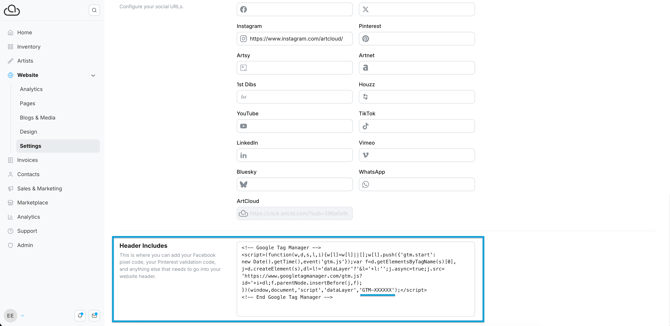
Here's an example of what the first script looks like, where "GTM-XXXXXX" represents your unique GTM ID.
``
``
``
#### **2. Global Scripts**
The second GTM script goes in the Global Scripts field.
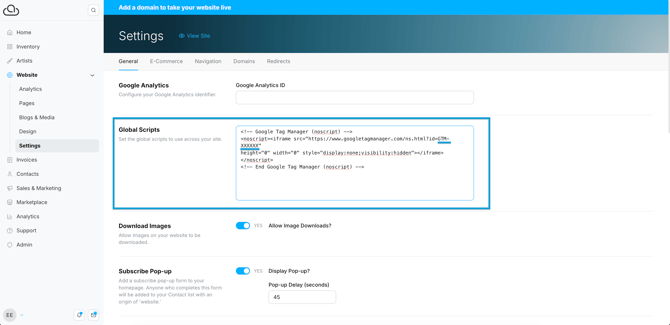
Here's an example of what the second script looks like, where "GTM-XXXXXX" represents your unique GTM ID.
``
``
``
**Note:** Use the Header Includes and Global Scripts fields for your GTM script. The separate Google Analytics field is for your Google Analytics ID. Read more here: [Connect Google Analytics.](https://help.artcloud.com/knowledge/connect-google-analytics?hsLang=en-us)
- [Welcome to ArtCloud](https://help.artcloud.com/knowledge/welcome-to-artcloud?hsLang=en-us#main-content)
- [Subscription](https://help.artcloud.com/knowledge/welcome-to-artcloud?hsLang=en-us#subscription)
- [Navigation](https://help.artcloud.com/knowledge/welcome-to-artcloud?hsLang=en-us#navigation)
- [Records](https://help.artcloud.com/knowledge/welcome-to-artcloud?hsLang=en-us#records)
- [Extras](https://help.artcloud.com/knowledge/welcome-to-artcloud?hsLang=en-us#extras)
- [Getting Started Series](https://help.artcloud.com/knowledge/getting-started-series?hsLang=en-us#main-content)
- [Manager](https://help.artcloud.com/knowledge/getting-started-series?hsLang=en-us#manager)
- [Website Builder](https://help.artcloud.com/knowledge/getting-started-series?hsLang=en-us#website-builder)
- [ArtCloud for Artists](https://help.artcloud.com/knowledge/artcloud-for-artists?hsLang=en-us#main-content)
- [Gallery Connections and Consignments](https://help.artcloud.com/knowledge/artcloud-for-artists?hsLang=en-us#gallery-connections-and-consignments)
- [Data Import](https://help.artcloud.com/knowledge/artcloud-for-artists?hsLang=en-us#data-import)
- [Account Settings](https://help.artcloud.com/knowledge/artcloud-for-artists?hsLang=en-us#account-settings)
- [Account Settings](https://help.artcloud.com/knowledge/account-settings?hsLang=en-us#main-content)
- [Profile](https://help.artcloud.com/knowledge/account-settings?hsLang=en-us#profile)
- [Billing & Subscription](https://help.artcloud.com/knowledge/account-settings?hsLang=en-us#billing-subscription)
- [Locations](https://help.artcloud.com/knowledge/account-settings?hsLang=en-us#locations)
- [Configuration](https://help.artcloud.com/knowledge/account-settings?hsLang=en-us#configuration)
- [Email Templates](https://help.artcloud.com/knowledge/account-settings?hsLang=en-us#email-templates)
- [Collateral Style](https://help.artcloud.com/knowledge/account-settings?hsLang=en-us#collateral-style)
- [Stripe Integration](https://help.artcloud.com/knowledge/account-settings?hsLang=en-us#stripe-integration)
- [Other Integrations](https://help.artcloud.com/knowledge/account-settings?hsLang=en-us#other-integrations)
- [User Management](https://help.artcloud.com/knowledge/account-settings?hsLang=en-us#user-management)
- [Data Import](https://help.artcloud.com/knowledge/account-settings?hsLang=en-us#data-import)
- [Tag Management](https://help.artcloud.com/knowledge/account-settings?hsLang=en-us#tag-management)
- [Batches](https://help.artcloud.com/knowledge/account-settings?hsLang=en-us#batches)
- [Merge Contacts](https://help.artcloud.com/knowledge/account-settings?hsLang=en-us#merge-contacts)
- [Blocked Emails](https://help.artcloud.com/knowledge/account-settings?hsLang=en-us#blocked-emails)
- [ArtCloud Website Builder](https://help.artcloud.com/knowledge/artcloud-website-builder?hsLang=en-us#main-content)
- [Understanding the Website Builder](https://help.artcloud.com/knowledge/artcloud-website-builder?hsLang=en-us#understanding-the-website-builder)
- [Design](https://help.artcloud.com/knowledge/artcloud-website-builder?hsLang=en-us#design)
- [Pages](https://help.artcloud.com/knowledge/artcloud-website-builder?hsLang=en-us#pages)
- [Blocks / Snippets](https://help.artcloud.com/knowledge/artcloud-website-builder?hsLang=en-us#blocks-snippets)
- [Resource Templates - Artist Profile](https://help.artcloud.com/knowledge/artcloud-website-builder?hsLang=en-us#resource-templates-artist-profile)
- [Resource Templates - Inventory Detail](https://help.artcloud.com/knowledge/artcloud-website-builder?hsLang=en-us#resource-templates-inventory-detail)
- [Resource Templates - Exhibition Detail](https://help.artcloud.com/knowledge/artcloud-website-builder?hsLang=en-us#resource-templates-exhibition-detail)
- [Resource Templates - Header](https://help.artcloud.com/knowledge/artcloud-website-builder?hsLang=en-us#resource-templates-header)
- [Resource Templates - Footer](https://help.artcloud.com/knowledge/artcloud-website-builder?hsLang=en-us#resource-templates-footer)
- [Other Resource Templates](https://help.artcloud.com/knowledge/artcloud-website-builder?hsLang=en-us#other-resource-templates)
- [Inventory Block Configuration](https://help.artcloud.com/knowledge/artcloud-website-builder?hsLang=en-us#inventory-block-configuration)
- [Artist Block Configuration](https://help.artcloud.com/knowledge/artcloud-website-builder?hsLang=en-us#artist-block-configuration)
- [Exhibition Block Configuration](https://help.artcloud.com/knowledge/artcloud-website-builder?hsLang=en-us#exhibition-block-configuration)
- [Blog](https://help.artcloud.com/knowledge/artcloud-website-builder?hsLang=en-us#blog)
- [Media](https://help.artcloud.com/knowledge/artcloud-website-builder?hsLang=en-us#media)
- [Settings](https://help.artcloud.com/knowledge/artcloud-website-builder?hsLang=en-us#settings)
- [Navigation](https://help.artcloud.com/knowledge/artcloud-website-builder?hsLang=en-us#navigation)
- [Domains](https://help.artcloud.com/knowledge/artcloud-website-builder?hsLang=en-us#domains)
- [Tips and Tricks](https://help.artcloud.com/knowledge/artcloud-website-builder?hsLang=en-us#tips-and-tricks)
- [Extras](https://help.artcloud.com/knowledge/artcloud-website-builder?hsLang=en-us#extras)
- [ArtCloud Manager - Dashboard](https://help.artcloud.com/knowledge/artcloud-manager-dashboard?hsLang=en-us#main-content)
- [Messages](https://help.artcloud.com/knowledge/artcloud-manager-dashboard?hsLang=en-us#messages)
- [New Arrivals](https://help.artcloud.com/knowledge/artcloud-manager-dashboard?hsLang=en-us#new-arrivals)
- [ArtCloud Manager - Inventory](https://help.artcloud.com/knowledge/artcloud-manager-inventory?hsLang=en-us#main-content)
- [Inventory Dashboard](https://help.artcloud.com/knowledge/artcloud-manager-inventory?hsLang=en-us#inventory-dashboard)
- [Inventory Record Overview](https://help.artcloud.com/knowledge/artcloud-manager-inventory?hsLang=en-us#inventory-record-overview)
- [Inventory Record - Financial](https://help.artcloud.com/knowledge/artcloud-manager-inventory?hsLang=en-us#inventory-record-financial)
- [Inventory Record - Uploads](https://help.artcloud.com/knowledge/artcloud-manager-inventory?hsLang=en-us#inventory-record-uploads)
- [Inventory Record - Marketplace/Website](https://help.artcloud.com/knowledge/artcloud-manager-inventory?hsLang=en-us#inventory-record-marketplace-website)
- [Inventory Record - History](https://help.artcloud.com/knowledge/artcloud-manager-inventory?hsLang=en-us#inventory-record-history)
- [Editions](https://help.artcloud.com/knowledge/artcloud-manager-inventory?hsLang=en-us#editions)
- [Exhibitions](https://help.artcloud.com/knowledge/artcloud-manager-inventory?hsLang=en-us#exhibitions)
- [Quicklists](https://help.artcloud.com/knowledge/artcloud-manager-inventory?hsLang=en-us#quicklists)
- [Consignment](https://help.artcloud.com/knowledge/artcloud-manager-inventory?hsLang=en-us#consignment)
- [ArtCloud Manager - Artists](https://help.artcloud.com/knowledge/artcloud-manager-artists?hsLang=en-us#main-content)
- [Artists Dashboard](https://help.artcloud.com/knowledge/artcloud-manager-artists?hsLang=en-us#artists-dashboard)
- [Artist Record - Profile](https://help.artcloud.com/knowledge/artcloud-manager-artists?hsLang=en-us#artist-record-profile)
- [Artist Record - Contact](https://help.artcloud.com/knowledge/artcloud-manager-artists?hsLang=en-us#artist-record-contact)
- [Artist Record - Consignment](https://help.artcloud.com/knowledge/artcloud-manager-artists?hsLang=en-us#artist-record-consignment)
- [Artist Record - Payments](https://help.artcloud.com/knowledge/artcloud-manager-artists?hsLang=en-us#artist-record-payments)
- [Artist Record - Marketplace/Website](https://help.artcloud.com/knowledge/artcloud-manager-artists?hsLang=en-us#artist-record-marketplace-website)
- [ArtCloud Manager - Invoices](https://help.artcloud.com/knowledge/artcloud-manager-invoices?hsLang=en-us#main-content)
- [Invoices Dashboard](https://help.artcloud.com/knowledge/artcloud-manager-invoices?hsLang=en-us#invoices-dashboard)
- [Invoice Record - Invoice](https://help.artcloud.com/knowledge/artcloud-manager-invoices?hsLang=en-us#invoice-record-invoice)
- [Invoice Record - Payments](https://help.artcloud.com/knowledge/artcloud-manager-invoices?hsLang=en-us#invoice-record-payments)
- [Logistics and Purchase Orders](https://help.artcloud.com/knowledge/artcloud-manager-invoices?hsLang=en-us#logistics-and-purchase-orders)
- [ArtCloud Manager - Contacts](https://help.artcloud.com/knowledge/artcloud-manager-contacts?hsLang=en-us#main-content)
- [Contacts Dashboard](https://help.artcloud.com/knowledge/artcloud-manager-contacts?hsLang=en-us#contacts-dashboard)
- [Contact Records](https://help.artcloud.com/knowledge/artcloud-manager-contacts?hsLang=en-us#contact-records)
- [Contact Record - Interests](https://help.artcloud.com/knowledge/artcloud-manager-contacts?hsLang=en-us#contact-record-interests)
- [Contact Record - Opportunities](https://help.artcloud.com/knowledge/artcloud-manager-contacts?hsLang=en-us#contact-record-opportunities)
- [Contact Record - Activities](https://help.artcloud.com/knowledge/artcloud-manager-contacts?hsLang=en-us#contact-record-activities)
- [Contact Record - Purchase History](https://help.artcloud.com/knowledge/artcloud-manager-contacts?hsLang=en-us#contact-record-purchase-history)
- [Contact Record - Financial](https://help.artcloud.com/knowledge/artcloud-manager-contacts?hsLang=en-us#contact-record-financial)
- [Audiences - ArtCloud Marketing](https://help.artcloud.com/knowledge/artcloud-manager-contacts?hsLang=en-us#audiences-artcloud-marketing)
- [ArtCloud Manager - Sales & Marketing](https://help.artcloud.com/knowledge/artcloud-manager-sales-marketing?hsLang=en-us#main-content)
- [Private Views](https://help.artcloud.com/knowledge/artcloud-manager-sales-marketing?hsLang=en-us#private-views)
- [To-Dos](https://help.artcloud.com/knowledge/artcloud-manager-sales-marketing?hsLang=en-us#to-dos)
- [Campaigns - ArtCloud Marketing](https://help.artcloud.com/knowledge/artcloud-manager-sales-marketing?hsLang=en-us#campaigns-artcloud-marketing)
- [Promo Codes](https://help.artcloud.com/knowledge/artcloud-manager-sales-marketing?hsLang=en-us#promo-codes)
- [Opportunities - ArtCloud Sales](https://help.artcloud.com/knowledge/artcloud-manager-sales-marketing?hsLang=en-us#opportunities-artcloud-sales)
- [ArtCloud Manager - Analytics](https://help.artcloud.com/knowledge/artcloud-manager-analytics?hsLang=en-us#main-content)
- [Analytics Overview](https://help.artcloud.com/knowledge/artcloud-manager-analytics?hsLang=en-us#analytics-overview)
- [Sales Over Time](https://help.artcloud.com/knowledge/artcloud-manager-analytics?hsLang=en-us#sales-over-time)
- [Payments](https://help.artcloud.com/knowledge/artcloud-manager-analytics?hsLang=en-us#payments)
- [Taxes](https://help.artcloud.com/knowledge/artcloud-manager-analytics?hsLang=en-us#taxes)
- [Artist/Consigner Payments](https://help.artcloud.com/knowledge/artcloud-manager-analytics?hsLang=en-us#artist-consigner-payments)
- [Commission](https://help.artcloud.com/knowledge/artcloud-manager-analytics?hsLang=en-us#commission)
- [The ArtCloud Marketplace](https://help.artcloud.com/knowledge/the-artcloud-marketplace?hsLang=en-us#main-content)
- [Marketplace](https://help.artcloud.com/knowledge/the-artcloud-marketplace?hsLang=en-us#marketplace)
- [Privacy and Terms](https://help.artcloud.com/knowledge/privacy-and-terms?hsLang=en-us)
- [ArtCloud Announcements](https://help.artcloud.com/knowledge/artcloud-announcements?hsLang=en-us)
[](https://www.artcloud.com)
Copyright © 2026, Artlogic Media Limited