
Note: Campaigns are available to Pro Plus Legacy Gallery Manager accounts.
New Gallery accounts subscribed to the Professional or Expert tier can add Campaigns to their subscription. Monthly campaign volume starts at 10,000 sends at $30 per month, and the monthly price increases as you add more sends.
To upgrade your account, visit the Subscription page in Account Settings or contact support@artcloud.com with questions.
Quick Jump To Guide
What is domain authentication?
How to authenticate your domain (shortened instructions)
How to authenticate your domain (extended instructions)
What is domain authentication?
Domain authentication confirms that an email sender is allowed to send emails on behalf of a domain. When you authenticate your domain, you're telling email providers, like Gmail and Outlook, that you own the domain you send emails from. This process helps your emails appear more trustworthy and improves deliverability.
How to authenticate your domain (shortened instructions)
How to authenticate your domain (extended instructions)
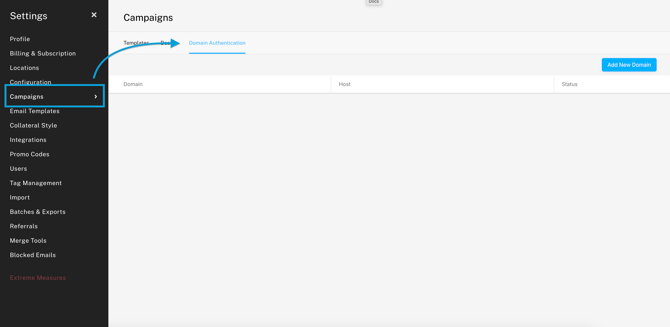
1. Navigate to Account Settings >> Campaigns >> Domain Authentication and click the "Add New Domain" button at the top right corner. A pop-out will appear on the right.
2. In another tab or window, log in to your domain registrar and find your DNS Records.
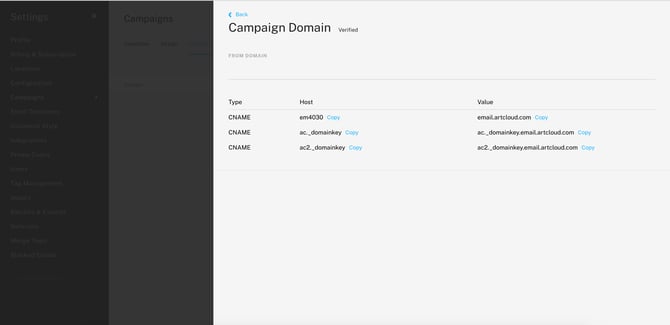
3. Once you've found your DNS records, create three new CNAME records. Copy and paste the CNAME information in ArtCloud to the corresponding fields in your domain registrar.
| Type | Host | Value |
| CNAME | em4696 | email.artcloud.com |
| CNAME | ac._domainkey | ac._domainkey.email.artcloud.com |
| CNAME | ac2._domainkey | ac2._domainkey.email.artcloud.com |
The process of editing DNS records varies across domain registrars. Find instructions on how to add CNAMEs to popular domain hosts below:
If you need assistance finding your DNS records, please reach out to Support.